Accessibility for Joomla

JS Accessibility Fixer

Finds accessibility problems in your articles, modules, menus, categories and pages. AI suggests each fix, you approve it, and you can undo it.

See plans
How it works
Version 1.2.0 Joomla 5.4 and 6 English and German 4 downloads
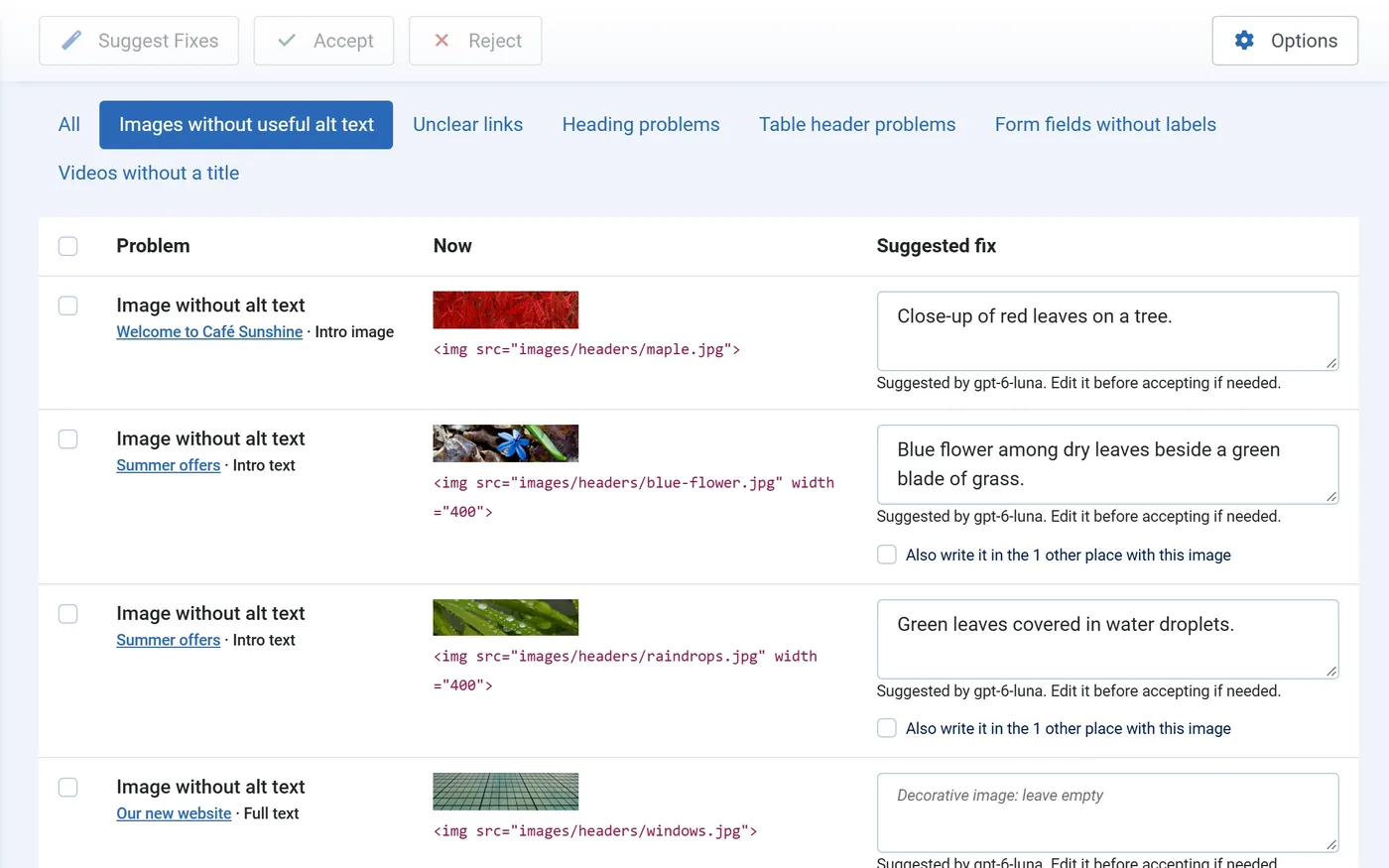
Fix Queue with AI suggestions for images without alt text, each ready to edit, accept or reject
Pricing

Every Pro feature. One yearly price.

Every Pro feature is in the plan. Choose how many sites the licence covers. Updates and help from the developers come with it, all year. The licence key brings updates and support; Pro works without it.

JS Accessibility Fixer Pro

Every Pro feature, a year of updates and help, renews yearly. Cancel anytime.

How many sites?
  • Unlimited AI alt text and link text
  • Fixes for headings, tables and form labels
  • One image, one fix, in every language
  • Suggest for all, and fixes suggested every night
  • Monthly scan with an email
  • Accessibility statement and client report
  • HikaShop, VirtueMart and JS Jobs content
  • Help by support ticket
  • Updates inside JoomlaNew versions install from the admin.
  • Help from the developersAsk by ticket from your account.
  • Yours to keepPro keeps working if you stop renewing; only updates and support stop.
How it works

Scan. Review the suggestion. Accept.

Fixes go into your stored content, the articles, modules, menu items and categories themselves. Nothing is added on top of your pages, and nothing changes until you accept it.

1. Scan

Your content
Published articles (text and their intro and full-article images), Custom modules, menu item titles and categories (description and image).
Your pages
The home page and every menu item, checked as a visitor sees them with Sa11y, the checker built into Joomla. This finds template problems such as low colour contrast.

2. AI suggests

Alt text for images
A short description of what the image shows, in the article’s language. Alt text that is only a file name (“IMG_2041.jpg”) or says nothing (“image”) is rewritten too.
Clear link text
“Click here” and “weiterlesen” become text that says where the link goes. Unclear menu titles too.
Video titles, no AI needed
YouTube and Vimeo videos get their real title from the video service, with no key.

3. You approve

Edit, accept or reject
Accepting changes only that one image, link or title. Nothing else in the content is touched.
History with undo
Every fix is kept with the text before and after. One click undoes it, as long as nobody has changed that text since.
Safe by design
If the content changed after the scan, nothing is written.
What it does

Finds the problems, writes the fixes, keeps the proof.

Everything below is in JS Accessibility Fixer Pro; the table further down shows what the free version includes.

Find

Content and pages
Your stored content, and the pages as visitors see them.
Check on save
Editors see the problems of an article, module or category as soon as they save it.
Every common problem
Images, links, headings, tables, form fields and videos.
Shops and job boards
HikaShop and VirtueMart product descriptions, and JS Jobs listings.

Fix

AI alt and link text
Suggested one by one, approved by you.
Video titles
From YouTube and Vimeo, without AI.
Headings, tables and form labels
Skipped headings, tables without header cells, fields without labels.
One image, one fix
The same alt text in every place an image is used, translated for your other languages.

Prove

Score and trend
A score out of 100 that rises as you accept fixes.
History with undo
Every fix, with the text before and after.
Accessibility statement
Written from the latest scan, in English or German, for you to check before publishing.
Client report
A monthly report with your logo, saved as a PDF.
Free or Pro

What the free version includes.

The free version finds the problems and fixes alt text, link text and video titles. Pro adds fixes for headings, tables and form labels, suggestions for every problem at once and every night, your accessibility statement, client reports, and shops and job boards.

FeatureFreePro
Find
Scan of your contentArticles, Custom modules, menu items and categories✓✓
Check of the pages visitors seeTemplate problems such as contrast✓✓
Check on saveWhen an article, module or category is saved✓✓
Shops and job boardsHikaShop and VirtueMart product descriptions, JS Jobs listings–✓
Fix
AI alt text and link textApproved one by one50 a monthUnlimited
Video titlesFrom YouTube and Vimeo, no AI needed✓✓
History of every fixWith undo✓✓
Headings, tables and form labelsFixes for each–✓
One image, one fixSame alt text in every place, translated for other languages–✓
Suggest for allEvery problem at once, with a progress bar–✓
Keep up
Fixes suggested every nightWaiting for you in the Fix Queue–✓
Monthly scanWith an email saying how many fixes are ready–✓
Prove
Score out of 100With the trend of recent scans✓✓
Accessibility statementEnglish or German, saved as an article–✓
Client reportWith your logo, saved as a PDF–✓
Help
Updates inside JoomlaNew versions from System › Update✓✓
Help by support ticketFrom the developers–✓

Both versions: Claude, Gemini or OpenAI with your own key and a monthly spend cap; English and German; Joomla 5.4 and 6; no overlay widget.

Questions

About JS Accessibility Fixer.

More answers in the documentation, or ask us in a ticket.

Which Joomla versions does it run on?

Joomla 5.4 and later, and Joomla 6, on PHP 8.1 or later.

Does it take care of the European Accessibility Act for me?

No tool can do that alone. It finds and fixes the problems automated checks can find, writes your accessibility statement, and keeps the record. A full audit also needs a person.

Does it add an accessibility widget to my site?

No. Widgets change the page in the visitor’s browser and leave the real content as it was. JS Accessibility Fixer fixes the content where it is stored, so every visitor and every screen reader gets the fixed version.

Do I need an AI account?

Only for AI suggestions. Scanning, the score, the page check and fixes you write yourself work without one. For suggestions, add a key from Anthropic Claude, Google Gemini or OpenAI in Options.

What does the AI cost?

You pay your AI provider directly, and very little: in our tests, eleven suggestions cost well under one cent. A monthly spend cap in Options stops it at the amount you set.

What is sent to the AI?

Only the image or link text you ask a suggestion for, and only when you ask. Nothing is sent during a scan. For a video title, your site asks YouTube or Vimeo for that video’s title; no AI is involved.

Can I undo a fix?

Yes. The History screen lists every fix with the text before and after, and Undo puts the old text back with one click. If someone has edited that text since, Undo leaves it alone, so no later work is lost.

Can I upgrade from the free version?

Yes. Install Pro over it; scans, fixes, history and settings are kept. See the upgrade guide.

Does Pro need the licence key to work?

No. Every Pro feature works without it. The key brings updates and support.

What happens when my licence ends?

Pro keeps working. New versions and support stop until you renew.

Do I need HikaShop, VirtueMart or JS Jobs?

No. If you have them, Pro checks their content too; if not, nothing changes.
Try JS Accessibility Fixer on your own site.

The free version installs in a few minutes and shows your score straight away. Go Pro when your sites grow.

See plans